
Part 2: SEO Setup
This guide, Part 2 of our SEO series, walks you through setting up Lovalingo's SEO features. Learn how to integrate SEO prompts, configure your sitemap, and submit it to Google Search Console for improved indexing.
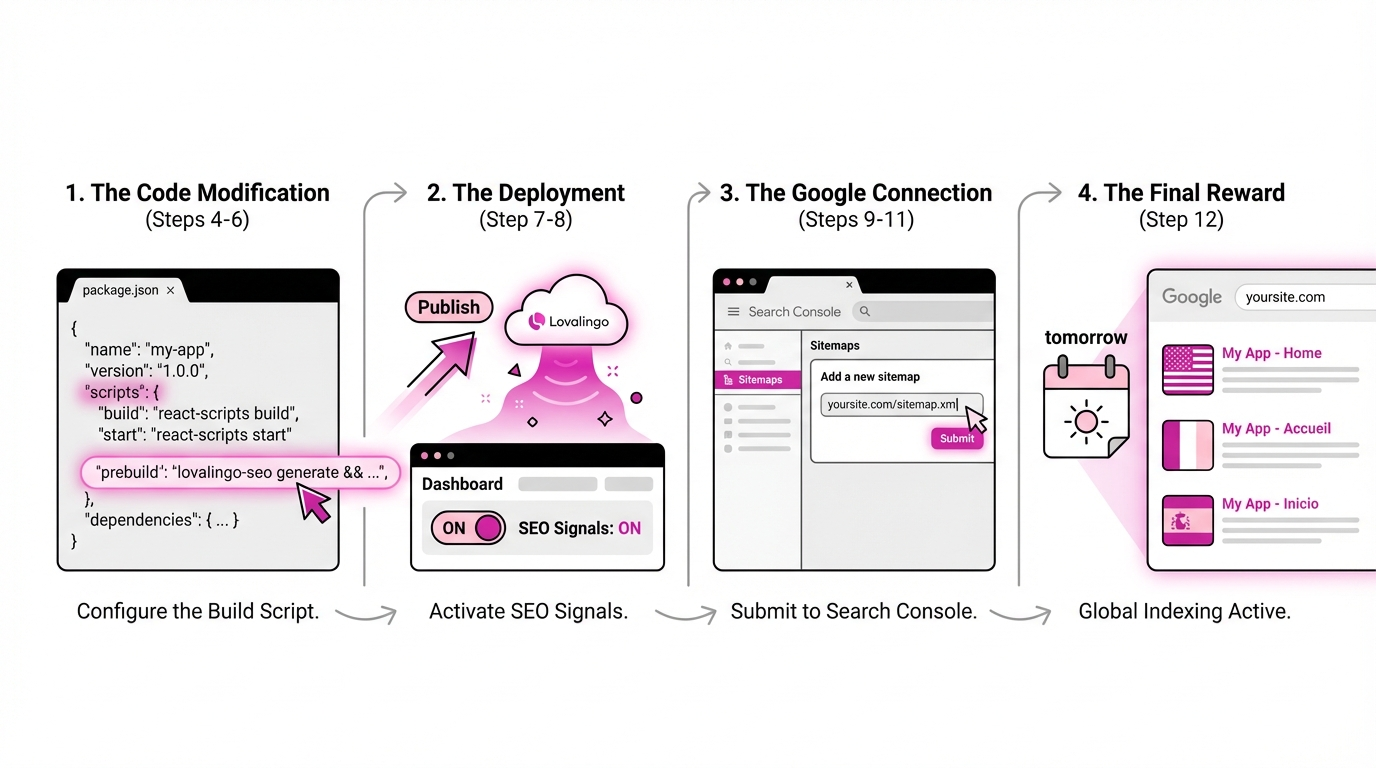
Step 1: In the Lovalingo's SEO tab, turn ON the toggle, and copy the second prompt SEO prompt
Step 2: Go to Lovable (or your vibe coding tool), paste it, and run it.
Step 3: Once done, copy this prebuild script line:
"prebuild": "node scripts/fetch-lovalingo-sitemap.mjs"Step 4: In your vibe coding tool, go to Code view and find package.json .
Step 5: Locate the scripts section (usually around line 6).
Step 6: Paste the prebuild line inside the scripts block and add a comma

Step 7: Save the file and Publish/Update your site.

Step 8: Copy your your new automatically updated sitemap.
Step 9: Go to Google Search Console:
- If you have your own domain, use the Domain option.
- If you use a Lovable subdomain, use URL Prefix.
Step 10: Submit your sitemap URL. Your website is now indexed!
If it says "Couldn't fetch", don't worry. Come back in 24h to the Google Search Console and you will see your translated pages being indexed by Google.