
Zero-Flash or Bust: Why We Built a Translation Engine for the AI-App Era
Discover why traditional website translation methods are failing in the AI era, causing credibility issues and high bounce rates. This post explains the critical need for "zero-flash" translation and introduces Lovalingo, a solution built to meet this standard. Learn how a seamless multilingual experience is now essential for global businesses.
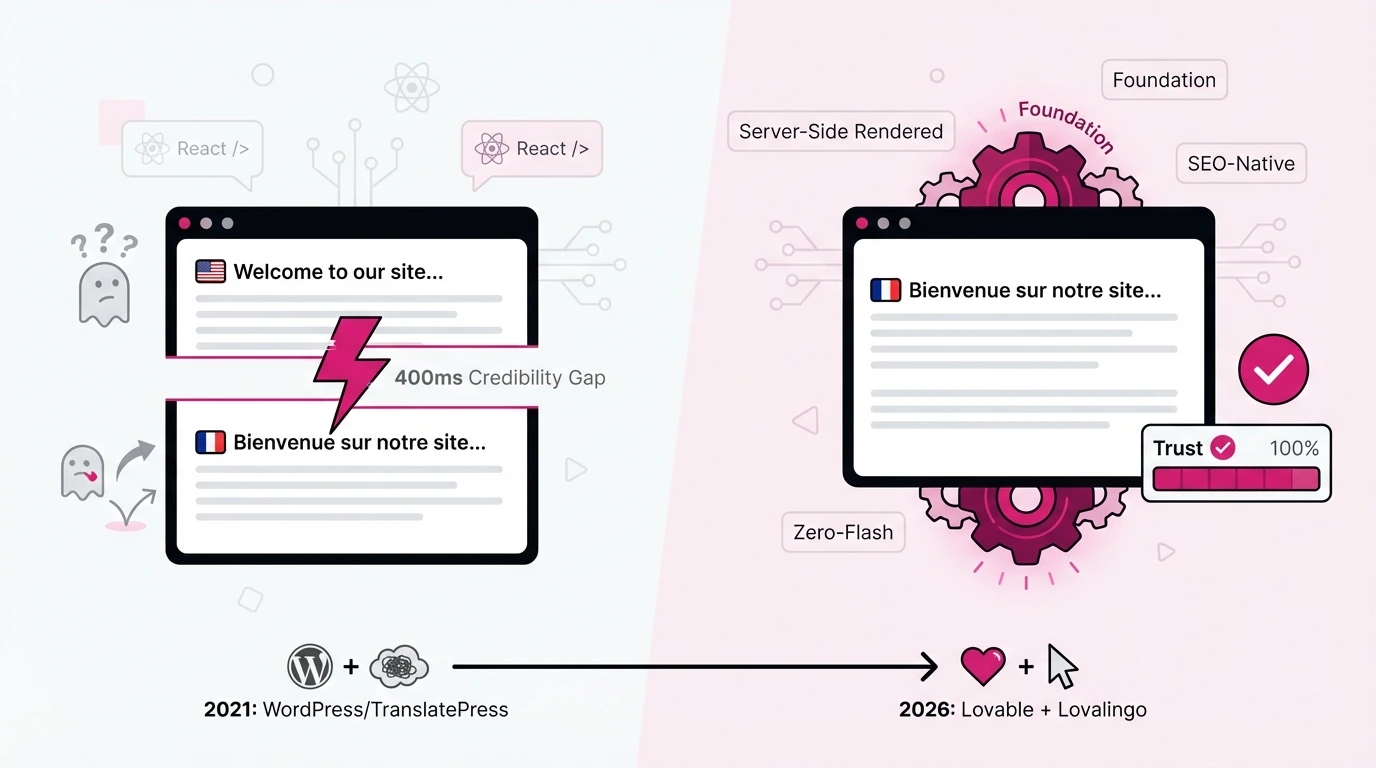
Five years ago, I started a B2B lead generation agency in Switzerland. Five years later, I finally admitted what I'd been avoiding: my WordPress website (translated with TranslatePress) was silently destroying my credibility with every page load.

The problem? That half-second flash where visitors see English before the page snaps to French. Or German. Or Italian.
In 2026, this is inexcusable. And yet, when I rebuilt my site using Lovable - one of the new "vibe coding" platform - I discovered the translation problem was even harder to solve than before.
This is the story of why we built Lovalingo, and why "zero-flash" isn't a feature. It's the minimum standard.
The Moment I Realized Translation Was Broken
My agency serves clients across Switzerland's linguistic regions: French-speaking Suisse Romande, German-speaking Deutschschweiz, Italian-speaking Ticino. We also work with companies in France, Germany, the UK, and the United States.
For five years, I used TranslatePress on WordPress. It worked (sort of).
The workflow looked like this:
Add new content in English
Remember to translate it manually
Ask my team to verify all language versions
Discover weeks later that someone forgot to translate the CTA button
Watch analytics show high bounce rates on German pages
The worst part? My team didn't speak all four languages. They couldn't visually verify translations were complete. So we built scripts. We wrote prompts to copy-paste page content and check for untranslated strings.
We were spending hours managing something that should have been automatic.
When I discovered Lovable and rebuilt the entire site in a weekend, I was thrilled - until I tried to make it multilingual. Nothing worked. The AI didn't understand i18n configuration. Manual setup broke the codebase. And every "solution" I found online created that dreaded flash.
Why "Good Enough" Translation Destroys Your Brand
Here's what happens when a French-speaking prospect visits your site:
0ms: Page starts loading
200ms: English content appears (your default language)
400ms: Translation widget loads
600ms: Page "snaps" to French
That 400-millisecond window tells your visitor everything they need to know about your attention to detail.
If you can't get your own website right, why would they trust you with their lead generation? Their sales process? Their revenue?
This isn't theoretical. I've seen it in our sales calls. Prospects mention "the site seemed a bit... unfinished." They can't articulate why. But I know exactly what they saw.
In B2B services (where trust is the product) a translation flash is a conversion killer.
The Vibe Coding Translation Gap
"Vibe coding" is the new paradigm. Platforms like Lovable, Bolt, and Cursor let you describe what you want in natural language, and AI generates the code.
It's revolutionary for building apps. It's terrible for translation.
Here's why:
The AI doesn't understand i18n architecture.
When you tell Lovable "make this site available in French and German," it might:
Duplicate your components (nightmare to maintain)
Add a translation package with no configuration
Create broken JSON files that crash on load
Simply ignore the request
react-i18next requires manual setup.
The standard React translation library expects you to:
Wrap every translatable string in
t()functionsCreate and maintain JSON locale files for each language
Configure language detection
Handle server-side rendering properly
Prevent hydration mismatches
None of this is "vibe coding." It's traditional development work - exactly what these platforms were supposed to eliminate.
Widgets make everything worse.
The "easy" solution - adding a Weglot or TranslatePress widget - creates the flash problem by design. These tools inject translation after the page loads. They can never be zero-flash.
What We Learned from 5 Years of Inbox Management
At devlo, my agency, we've managed email deliverability for hundreds of clients. One principle became obvious: invisible problems cause visible damage.
A misconfigured SPF record doesn't announce itself. Your emails just... stop arriving. By the time you notice, you've lost months of pipeline.
Translation quality works the same way.
You don't see the French visitor who bounced after 0.6 seconds. You don't know the German prospect who formed a negative impression before reading a single word. The damage is invisible until it becomes catastrophic.
Most founders discover translation problems when:
They expand to a new market and conversions tank
A client mentions "your site looked weird"
They finally view their own site in another language
By then, the compounding damage is done.
The Architecture Decision: Engine vs. Widget
When I decided to solve this problem, I had 2 choices:
Option 1: Build a better widget
Take the TranslatePress approach but optimize for React. Load translations faster. Minimize the flash.
This couldn't work. Widgets are fundamentally client-side. They inject translation after the initial render. No amount of optimization eliminates the flash, it only shortens it.
Option 2: Build a translation engine
Integrate at the architecture level. Handle translation during server-side rendering. Generate proper routing and metadata. Make zero-flash not a goal but a guarantee.
This was the only path to quality.
Lovalingo is an engine, not a widget. It:
Extracts strings automatically from your codebase
Generates native i18n structure (JSON locales, proper
t()wrapping)Handles SSR correctly so translation happens before the browser receives HTML
Creates SEO infrastructure (hreflang tags, language-specific URLs, translated metadata)
The result? Zero flash. Every time. By design.
Zero-Flash: A Non-Negotiable Standard for 2026
Let me be direct: if your site flashes untranslated content, you're operating below the acceptable standard for professional web presence in 2026.
What "zero-flash" means technically:
The initial HTML served to the browser is already in the correct language
No client-side language detection after load
No visible content swap
No layout shift from translation changes
Why this matters for SEO:
Google's crawlers see your initial HTML. If that HTML is in English but your hreflang says French, you're sending conflicting signals. This hurts rankings in every market.
With proper server-side translation:
Each language version has its own URL
HTML arrives in the declared language
Metadata (title, description) is translated
Hreflang relationships are explicit
The brand perception research is clear:
Users form judgments about website credibility in 50 milliseconds. A translation flash happens in 400-600ms—enough time to register as "something wrong" even if they can't articulate it.
In competitive markets, this microdetail separates winners from also-rans.
What Lovalingo Does Differently
Here's what I wanted: add multi-language support to my Lovable site with two prompts. Have it work correctly. Never think about it again.
That's what we built.
Automatic string extraction
Lovalingo analyzes your React components and identifies translatable text. No manual wrapping required. No forgotten strings.
Native i18n architecture
We generate proper react-i18next structure with JSON locale files. Your app gets real internationalization, not a band-aid widget.
Full auth page coverage
Login pages. Signup forms. Password reset screens. Error messages. The components widget solutions can't touch because they render before any script loads.
SEO metadata completion
Page titles. Meta descriptions. OpenGraph tags. All translated. All indexed correctly. Your French page ranks for French keywords.
Two-prompt implementation
Tell your AI builder: "Add Lovalingo for French, German, and Italian." Done.
The Future: Translation as Infrastructure
We're entering an era where AI generates applications faster than humans can maintain them. The bottleneck isn't building.
It's building correctly.
Translation should be infrastructure, not an afterthought.
When you spin up a new app with Lovable, you should be able to specify your target markets upfront. The application should generate with proper i18n from day one. Adding a language later should be one prompt.
This is what we're building toward.
The misconception we're fighting:
People think they're stuck with WordPress and Weglot. They think translation means manual verification, missing strings, and flashing content.
It doesn't have to.
The standard we're setting:
Zero-flash or bust. If your translation engine can't guarantee zero flash, it's not ready for production. Period.
Stop Losing Visitors to a Half-Second Flash
If you've built an app with Lovable, Bolt, Cursor, or any vibe-coding platform, and you're avoiding translation because it's "too complicated", you're leaving money on the table.
If you've added a translation widget and noticed bounce rates climb, now you know why.
Lovalingo exists because I needed it. And if you're building for international markets in 2026, you need it too.
Zero-flash. Automatic. SEO-native. Built for the AI-app era.
Because your credibility is decided in the first 500 milliseconds.
Charles is the CEO of devlo, a B2B lead generation agency, and co-founder of Lovalingo. After 5 years of fighting translation problems on WordPress and discovering the gap in AI app builders, he decided to solve it permanently.