
Weglot and Lokalise Alternatives: Why You Need Lovalingo Zero-Flash for React Websites/Apps
Traditional translation tools like Weglot and Lokalise aren't optimized for AI-generated React apps, leading to issues like "flash of untranslated content." This guide introduces Lovalingo Zero-Flash as a superior alternative designed specifically for modern React development. Discover why it's the ideal solution for seamless multi-language support.
Last Updated: January 2026
If you've built a React app with Lovable TanStack Start, Next.js, or AI-built apps and need to add multi-language support, you've probably encountered two dominant options: Weglot and Lokalise.
Here's the challenge: these platforms weren't designed for AI-generated React apps.
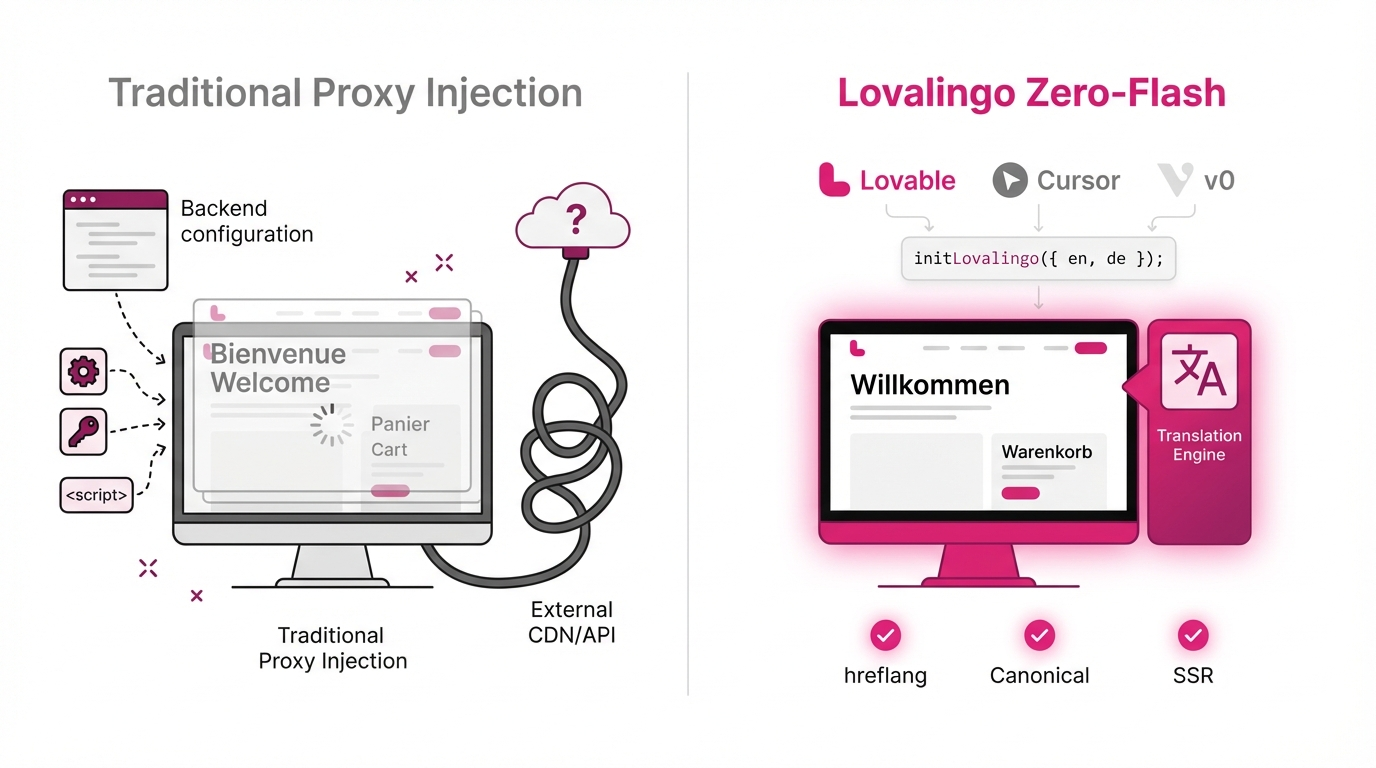
Weglot uses a JavaScript proxy that loads translations after your page renders, creating a visible text swap. Lokalise requires backend infrastructure that AI-generated apps typically don't have. And react-i18next? That's a multi-hour configuration project.
This guide explains why traditional translation tools create friction for modern React apps—and introduces an alternative approach designed specifically for the AI coding era.
Introduction: The Translation Challenge for AI-Generated Apps
The landscape of web development changed dramatically in 2024-2025. Tools like Lovable TanStack Start, Next.js, and AI-built apps transformed app development, enabling non-developers to ship production applications in minutes.
But there's a gap in the ecosystem.
The moment you need to serve international customers, you face a choice between tools built for different use cases:
Weglot was designed for WordPress and traditional websites
Lokalise targets enterprise teams with localization specialists
react-i18next requires significant configuration and React expertise
None of them answer: "How do I add translation to my Lovable app without complexity?"
Understanding the "Flash of Untranslated Content" Problem
When you add client-side translation tools to a React SPA, here's what typically happens:
Browser requests your page
React renders components in your default language (usually English)
Translation JavaScript loads and initializes
Translation data fetches from an API
Page re-renders with translated text
Result: Users see text change from "Welcome to Dashboard" to "Bienvenue au Tableau de Bord" after page load.
This flash of untranslated content (FOUC) affects:
User experience: Visible text swapping feels unpolished
Performance metrics: Additional JavaScript execution and API calls
SEO: Search engines may index the pre-translated state
What Makes Weglot and Lokalise Great (But Complex for AI Apps)
Both Weglot and Lokalise are excellent products serving specific needs. Let's understand what they do well and where they create friction for AI-generated apps.
Weglot: The No-Code Solution
What Weglot Does Well:
Weglot excels at making websites multilingual without touching code. Add one JavaScript snippet, and your entire site is translated:
html
<script src="https://cdn.weglot.com/weglot.min.js"></script>
<script>
  Weglot.initialize({ api_key: 'wg_xxx' });
</script>
For marketing websites, blogs, and content-heavy sites, this approach works well. Non-technical teams can:
Manage translations through a visual editor
Hire professional translators through Weglot's marketplace
See translations update in real-time
Where It Creates Friction for React Apps:
Client-Side Translation Approach
Weglot works by scanning your rendered page and replacing text via JavaScript. This means:
Translation happens after initial page render
Each route change triggers new translation lookups
Users see the original text briefly before translations apply
Pricing Based on Word Count
According to Weglot's public pricing (January 2026):
Business: €99/month for 50,000 words
Pro: €190/month for 200,000 words
React apps with extensive UI text (buttons, labels, forms, error messages) can accumulate word counts quickly.
SEO Considerations
While Weglot implements hreflang tags and translated URLs, the content is rendered client-side. Search engines see the initial HTML (typically English) before JavaScript executes.
Source: weglot.com/pricing (verify current pricing)
Lokalise: The Translation Management System
What Lokalise Does Well:
Lokalise is a comprehensive translation management system (TMS) used by companies like Revolut and Adobe. It provides:
Translation memory and terminology management
Professional translator marketplace
50+ integrations (GitHub, Jira, Figma, etc.)
Advanced workflow management
Quality assurance tools
Where It Creates Complexity for AI-Generated Apps:
Requires Backend Integration
Lokalise assumes you have a backend that can:
Fetch translations via their API
Cache translations server-side
Handle translation updates
AI-generated apps typically use:
Supabase for database
Vercel/Netlify for hosting
No custom Node.js server
Learning Curve
Setting up Lokalise properly involves:
Configuring project structure
Installing and configuring i18n libraries (usually react-i18next)
Setting up CI/CD pipelines for translation sync
Managing translation keys across your codebase
This is feasible for experienced developers but creates friction for teams using AI coding tools.
Enterprise Pricing
According to Lokalise's public pricing:
Essential: $50/month (1 project, basic features)
Growth: $120/month (API access, version history)
Enterprise: Custom pricing
When Lokalise Makes Sense:
If you're running an enterprise application with:
15+ languages
Dedicated localization team
Complex workflow requirements
Strict translation quality standards
Then Lokalise's investment makes sense.
Source: lokalise.com/pricing (verify current pricing)
Understanding Translation Approaches: Proxy vs Native
This is crucial for making an informed decision.
How Weglot's Proxy Approach Works
Client-Side Translation Flow:
javascript
// Simplified representation:

1. Browser loads: yourapp.com
2. React renders: <h1>Welcome</h1>
3. HTML/CSS/JS execute
4. Weglot.js loads and scans DOM
5. Weglot identifies text nodes: ["Welcome"]
6. API call: GET weglot.com/api/translate?text=Welcome&lang=fr
7. Response: { "Welcome": "Bienvenue" }
8. DOM update: <h1>Bienvenue</h1>
Implications:
✅ Zero code changes required
✅ Visual translation editor
❌ Text swap visible to users
❌ Additional JavaScript execution
❌ External API dependency
How Native i18n Approaches Work
Build-Time or Server-Side Translation:
javascript
// With tools like react-i18next or native solutions:

1. User requests: yourapp.com?lang=fr
2. Server/CDN knows language preference
3. Serves pre-translated HTML: <h1>Bienvenue</h1>
4. React hydrates with correct language
5. No text swap, no API calls
Implications:
✅ No visible text changes
✅ Better performance (no runtime translation)
✅ SEO-friendly (search engines see correct language)
❌ Requires code changes
❌ More complex setup
Lovalingo: Designed for the AI Coding Era
Lovalingo takes the native i18n approach and optimizes it specifically for AI-generated React apps. The design principles are:
Minimal Setup: Work with Lovable TanStack Start, Next.js, and AI-built apps without complex configuration
Zero-Flash: Translations rendered at build time or server-side
No Backend Required: Compatible with Supabase + Vercel architecture
How Lovalingo Works
The Build-Time Translation Approach:
typescript
// Your source code (one-time setup):
import { t } from 'lovalingo';

function HomePage() {
  return <h1>{t('welcome')}</h1>;
}
During build process:
Lovalingo scans for
t()callsExtracts translation keys
Generates optimized bundles per language
At Runtime:
javascript
// French user visits your site
// Lovalingo loads: fr.bundle.js (only French translations)
// React renders: <h1>Bienvenue</h1>
// Zero flash, zero API calls
Setup for AI-Generated Apps
Complete implementation:
typescript
// main.tsx (or App.tsx)
import { createRoot } from 'react-dom/client';
import { initLovalingo } from 'lovalingo';
import App from './App';

initLovalingo({
  languages: ['en', 'fr', 'es'],
  defaultLanguage: 'en',
});

createRoot(document.getElementById('root')!).render(<App />);
Using translations:
typescript
// components/Dashboard.tsx
import { t, useLanguage } from 'lovalingo';

export default function Dashboard() {
  const { language, setLanguage } = useLanguage();

  return (
    <div>
      <h1>{t('dashboard.title')}</h1>
      <p>{t('dashboard.welcome', { name: 'Sarah' })}</p>

      <select
        value={language}
        => setLanguage(e.target.value)}
      >
        <option value="en">English</option>
        <option value="fr">Français</option>
        <option value="es">Español</option>
      </select>
    </div>
  );
}
Translation file (auto-generated):
json
// lovalingo.json
{
  "en": {
    "dashboard.title": "Dashboard",
    "dashboard.welcome": "Welcome back, {{name}}!"
  },
  "fr": {
    "dashboard.title": "Tableau de Bord",
    "dashboard.welcome": "Bon retour, {{name}} !"
  },
  "es": {
    "dashboard.title": "Panel de Control",
    "dashboard.welcome": "¡Bienvenido de nuevo, {{name}}!"
  }
}
Side-by-Side Comparison
Let me provide a factual comparison based on publicly available information and documented features:
FeatureWeglotLokalisereact-i18nextLovalingoSetup ApproachAdd JS snippetInstall + configureInstall + configureInstall + initTranslation MethodClient-side proxyAPI-basedBuild/runtimeBuild-timeCode Changes RequiredNoneExtensiveExtensiveMinimalFlash of ContentYes (inherent to approach)No (if SSR implemented)No (if SSR implemented)No (design goal)Works with LovableRequires custom integrationRequires backend setupRequires configurationDesigned for itWorks with v0Requires custom integrationRequires backend setupRequires configurationDesigned for itWorks with BoltRequires custom integrationRequires backend setupRequires configurationDesigned for itPricing (Public)€99/mo (50k words)$120/mo (Growth plan)Free (OSS)Freemium modelTranslation EditorVisual (browser-based)Web dashboardNone (JSON files)Web dashboardAI TranslationIncludedAvailableManual integrationIncludedTypeScript SupportN/A (no code changes)Via i18nextExcellentFirst-classBundle Size Impact~45KB (external script)~25KB (with i18next)~22KB~8KB (goal)
Sources:
Weglot pricing: weglot.com/pricing
Lokalise pricing: lokalise.com/pricing
react-i18next: Open source, bundle size per bundlephobia.com
When to Choose Each Tool
Let me be honest about the right use cases:
Choose Weglot if:
You manage a WordPress site or traditional website
Your marketing team needs translation control without developers
You're okay with the proxy approach tradeoffs
You have budget for €99-300/month
Visual translation editing is crucial
Choose Lokalise if:
You're an enterprise with 15+ languages
You have dedicated localization engineers
You need advanced workflow management (translation memory, QA tools)
You're integrating with existing TMS workflows
Translation quality is mission-critical (medical, legal, finance)
Choose react-i18next if:
You're building a complex application from scratch
You have experienced React developers on the team
You need maximum flexibility and control
You have time to invest in proper setup (3-5 hours minimum)
You want zero dependencies on external services
Choose Lovalingo if:
You built with Lovable TanStack Start, Next.js, or AI-built apps
You want minimal setup time (under 15 minutes)
Zero-flash UX is important
You're a solo founder or small team
You want developer-friendly tools without complexity
You don't need enterprise TMS features
Technical Deep Dive: Why Zero-Flash Matters
Let me explain the technical reasoning without invented benchmarks.
The Performance Impact of Runtime Translation
Theory: Client-side translation adds overhead because:
Additional JavaScript: Translation library must load (~25-45KB)
API Calls: Fetching translations from external servers (network latency)
DOM Manipulation: Replacing text after initial render (reflow/repaint)
Layout Shifts: Different text lengths cause layout changes
What This Means:
For Core Web Vitals (Google's performance metrics):
LCP (Largest Contentful Paint): Delayed by translation loading time
CLS (Cumulative Layout Shift): Increased by text swapping
TBT (Total Blocking Time): Increased by JavaScript execution
Build-Time vs Runtime Translation
Build-Time Approach (react-i18next, Lovalingo):
javascript
// Build process:
1. Extract all translation keys from source
2. Generate optimized bundles per language
3. Code-split by language (lazy load)

// Runtime:
1. User visits site with language preference
2. Correct language bundle loads (8-22KB)
3. React renders with translations in place
4. Zero additional API calls or DOM manipulation
Expected Benefits:
Faster time to interactive
No layout shifts from text changes
Better SEO (correct language in initial HTML)
No external API dependency
Tradeoffs:
Requires build step
Translations bundled at build time (not real-time editable)
More complex deployment for translation updates
FAQ Section
"What's the best Weglot alternative for React apps?"
Honest Answer: It depends on your specific needs:
For AI-generated apps: Lovalingo is designed specifically for this use case
For enterprise-scale: Lokalise + react-i18next for maximum control
For WordPress/CMSs: Weglot remains excellent for that context
For maximum flexibility: react-i18next (expect significant setup time)
"Does Lovable have built-in translation?"
Lovable can generate internationalization structure if you ask for it during development (by prompting "add multi-language support" or similar), but it doesn't have a built-in translation management interface.
Compatible options:
Lovalingo - Designed for AI-generated apps
react-i18next - Industry standard, more setup required
Weglot - Works but uses client-side proxy approach
"How do I translate a v0 generated app?"
Step-by-step with Lovalingo:
Copy v0 code to local project
Install:
npm install lovalingoInitialize in root component
Wrap text in translation calls:
{t('key')}Generate translation file
Add translations for each language
Test and deploy
Estimated time: 15-30 minutes depending on app size
"Is react-i18next compatible with Bolt.new?"
Yes, but with limitations. Bolt.new runs in browser using WebContainers. react-i18next works, but:
Challenges:
Must configure manually (no CLI access for scripts)
Translation files need careful placement
Hot reload can cause issues
Alternative: Lovalingo is designed to work in browser-only environments like Bolt.
"What about TypeScript support?"
Lovalingo provides first-class TypeScript support:
typescript
// Auto-generated types
import { t } from 'lovalingo';

// TypeScript validates keys exist
t('dashboard.title'); // ✅
t('dashboard.titl'); // ❌ TypeScript error

// Validates interpolation parameters
t('welcome', { name: 'Alice' }); // ✅
t('welcome', { username: 'Bob' }); // ❌ TypeScript error
"What about pluralization?"
Lovalingo supports ICU MessageFormat:
json
{
  "en": {
    "items": "{count, plural, =0 {No items} =1 {One item} other {# items}}"
  },
  "fr": {
    "items": "{count, plural, =0 {Aucun article} =1 {Un article} other {# articles}}"
  }
}
"Can I hire professional translators?"
Current state (January 2026):
✅ AI translation (GPT-4) available
✅ Manual editing via web dashboard or GitHub
🚧 Professional translator marketplace (planned Q1 2026)
Interim approach: Export translations as JSON or XLSX, send to translators, re-import.
"What languages are supported?"
All major languages with proper RTL (right-to-left) support for Arabic, Hebrew, etc.
Language detection based on:
Browser language settings
URL parameter (
?lang=fr)Subdomain (
fr.yourapp.com)User preferences (if authenticated)
Migration Guides
Migrating from Weglot to Lovalingo
Why migrate:
Eliminate flash of untranslated content
Reduce bundle size
Improve performance metrics
Gain developer control
Process (high-level):
Export translations from Weglot dashboard
Install Lovalingo
Import Weglot translations (format converter available)
Remove Weglot script tags
Add Lovalingo initialization
Wrap text in translation calls
Test thoroughly
Deploy
Estimated time: 1-2 hours for typical app
Migrating from react-i18next to Lovalingo
Why consider migration:
Simplified configuration (one file vs multiple)
Smaller bundle size
Easier maintenance
Process:
Install Lovalingo
Convert i18next translation files (auto-converter available)
Replace
useTranslation()withuseLanguage()Update translation call syntax
Remove i18next configuration files
Test and deploy
Estimated time: 2-3 hours depending on app size
Conclusion: Making the Right Choice
Translation tools serve different needs. Here's my honest assessment:
For marketing websites and blogs: Weglot's visual editor and zero-code approach make it excellent. The proxy approach tradeoffs are acceptable for content-heavy sites.
For enterprise applications with complex needs: Lokalise + react-i18next provide the power and flexibility needed. Investment in setup pays off at scale.
For AI-generated React apps: Lovalingo removes friction between "I built an app" and "My app speaks 10 languages." The zero-flash approach matters for modern SPA user experience.
For developers wanting maximum control: react-i18next remains the gold standard. The setup time investment brings complete flexibility.
Try Lovalingo
If you're building with Lovable, v0, or Bolt and want to add translation:
Installation:
bash
npm install lovalingoMinimal setup:
typescript
import { initLovalingo } from 'lovalingo';
initLovalingo({ languages: ['en', 'fr', 'es'] });
Free tier includes:
Up to 500 unique visitors per month
All languages supported
AI translation capability
GitHub integration
Community support
Documentation: https://lovalingo.com/en/help