
How to Translate v0 Websites: The Complete 2026 Guide
Discover the fastest way to translate your v0.dev website without breaking previews or losing development velocity. This guide addresses common i18n challenges with v0, offering a seamless 3-step solution for multilingual support. Avoid the pitfalls of traditional translation methods and ensure your v0 projects are truly global.
Reading time: 6 minutes
Built a production app with v0.dev and need multilingual support? Here's the fastest way to translate your v0-generated website without breaking the preview or losing development velocity.
TL;DR: 3-Step Translation for v0.dev
Sign up at lovalingo.com with your v0 project URL
Copy the installation prompt and run it in v0 chat
Deploy your site - translations appear automatically
Your first language is free. Additional languages start at $9/month.
The v0.dev Translation Problem
v0.dev generates production-ready React and Next.js components instantly. But there's one thing it doesn't generate: internationalization that actually works.
Why Traditional i18n Breaks v0 Workflows
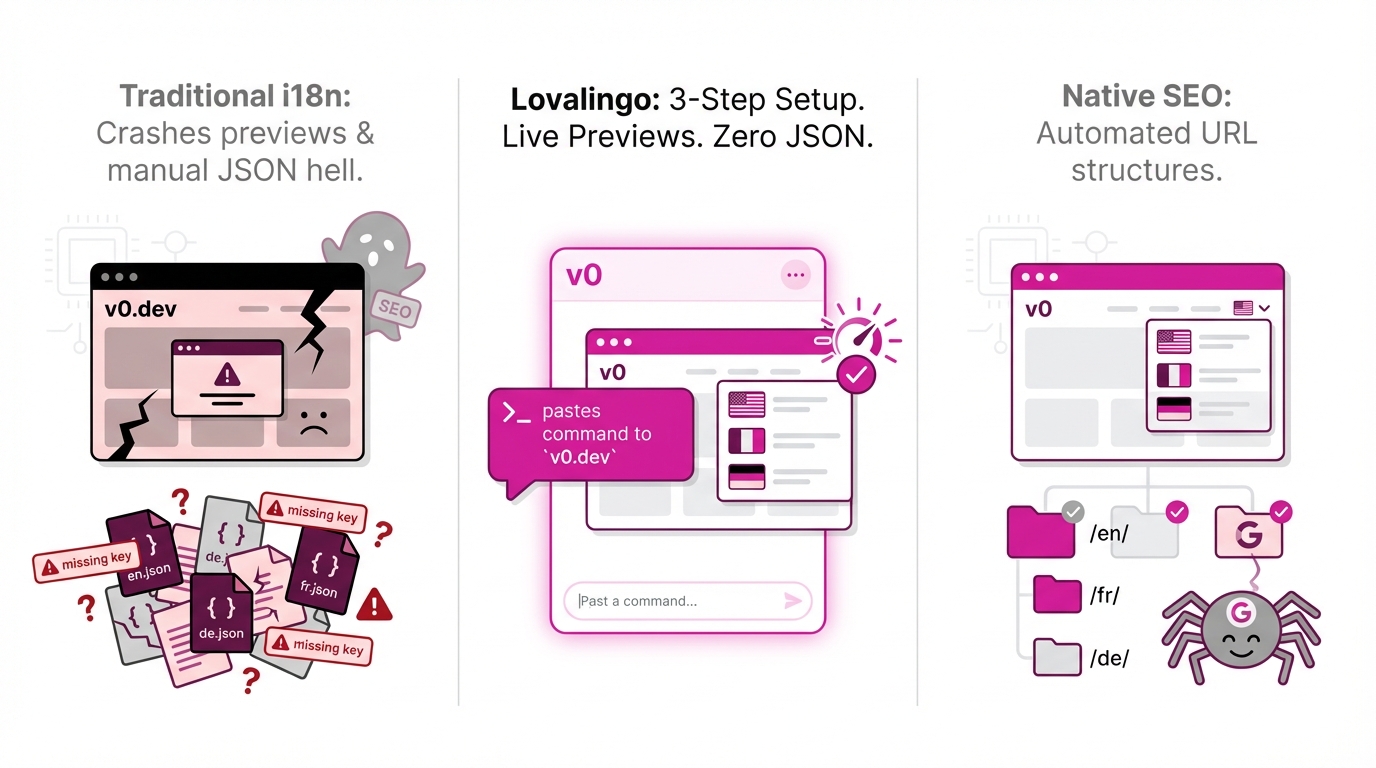
The Preview Killer
Community feedback is consistent: next-intl and react-intl crash v0's preview feature. Users report:
"Preview stopped working after adding next-intl"
"Cannot see the preview because internationalization is deprecated"
"v0 credits wasted trying to fix i18n issues"
You lose v0's core advantage - instant visual feedback.
The JSON File Nightmare
The recommended approach creates maintenance hell:
/locales/en.json (500 strings)
/locales/no.json (500 strings)
/locales/de.json (500 strings)
= 1,500 entries to synchronize manually
Every time v0 generates a new component:
Extract new text strings
Add to 3+ JSON files manually
Keep keys synchronized
Handle missing translations
Test every language
This completely kills v0's speed advantage.
The Key Management Chaos
Using JSON files means:
Same keys across all files (one typo breaks everything)
Manual string extraction from v0-generated code
Pluralization rules per language
Conditional text handling
Context-specific translations
700 strings × 5 languages = 3,500 manual entries. One wrong key and entire sections fail.
The SEO Invisibility
Client-side translation libraries render after page load:
Google crawls English content only
French pages don't rank in France
German content invisible to Berlin searches
Multilingual SEO requires manual hreflang setup
Your international traffic potential stays at zero.
The Solution: Automated Translation for v0.dev
Here's how to make your v0-generated app multilingual in under minutes while keeping the preview working.
Step 1: Create Your Lovalingo Project
Go to lovalingo.com
Click Start for Free
Enter your v0 project URL (or deployed domain)
Select source language (what v0 generated in)
Choose target languages (French, German, Spanish, etc.)
Step 2: Copy the Installation Prompt
You'll see a prompt specifically optimized for v0:
Install @lovalingo/lovalingo and wrap your app with LovalingoProvider:

npm install @lovalingo/lovalingo

Then wrap your root layout or app component:

import { LovalingoProvider } from '@lovalingo/lovalingo';

export default function RootLayout({ children }) {
  return (
    <html>
      <body>
        <LovalingoProvider
          publicAnonKey="aix_YOUR_KEY_HERE"
          defaultLocale="en"
          locales={["fr", "de", "es"]}
          routing="path"
        >
          {children}
        </LovalingoProvider>
      </body>
    </html>
  );
}
Copy this entire prompt.
Step 3: Run in v0.dev Chat
Open your v0 project
Paste the prompt into v0 chat
v0 will:
Install the package
Wrap your layout with the provider
Add the language switcher component
Configure clean URL routing
Maintain preview functionality
Takes 30 seconds. Preview keeps working.
Step 4: Deploy and Verify
Deploy to Vercel (v0's native platform)
Wait 2 minutes for deployment
Visit your live site
See the language switcher appear
Click a language - URL changes to
/fr,/de, etc.
Done. Your v0 app is now multilingual.
What Happens Automatically
Once installed, Lovalingo:
Detects All v0-Generated Content
Scans every component v0 created
Finds buttons, labels, headings, paragraphs
Extracts form placeholders and error messages
Captures dialog content and tooltips
Handles shadcn/ui component text
Translates Instantly
AI translates to your target languages
Maintains technical vs casual tone
Handles React-specific patterns
Preserves v0's component structure
Processes 100+ components in 24 hours
Updates on Changes
v0 generates new component? Translated automatically
Add new dialog? Detected and translated
Change button text? Updates across all languages
Regenerate section? Re-translated instantly
Zero JSON Management
No locale files to create
No string extraction needed
No key synchronization
No manual maintenance
No developer overhead
Preview Keeps Working
Unlike next-intl, preview doesn't crash
v0's instant feedback remains intact
Visual iterations continue at full speed
Development velocity maintained
Start Translating Your v0.dev App
Your v0-generated app deserves a global audience. Here's your action plan:
guided setup:
Sign up at lovalingo.com
Add your v0 project URL
Copy installation prompt with your key
Paste into v0 chat
Deploy to Vercel
First 24 Hours:
Translations complete automatically
Language switcher appears in navigation
URLs update to
/fr,/de,/esPreview functionality maintained
Content visible in all languages
Week 1:
Enable SEO features with second prompt
Submit sitemap to Google Search Console
Review translation quality in dashboard
Add brand terms to glossary
Continue iterating with v0 normally
Launch:
International traffic increases
SEO rankings improve per locale
Users see content in their language
Zero ongoing maintenance
v0 development speed unchanged
The best v0.dev projects reach global audiences. Make yours multilingual in minutes without breaking the preview.
Start Free Now - First language free, additional from $9/month.