
Best WPML Alternative for React & Next.js Apps in 2026
Looking for a WPML alternative for your React or Next.js app in 2026? WPML falls short for modern JavaScript frameworks. Discover how lovalingo offers seamless, SEO-optimized multilingual support for React applications.
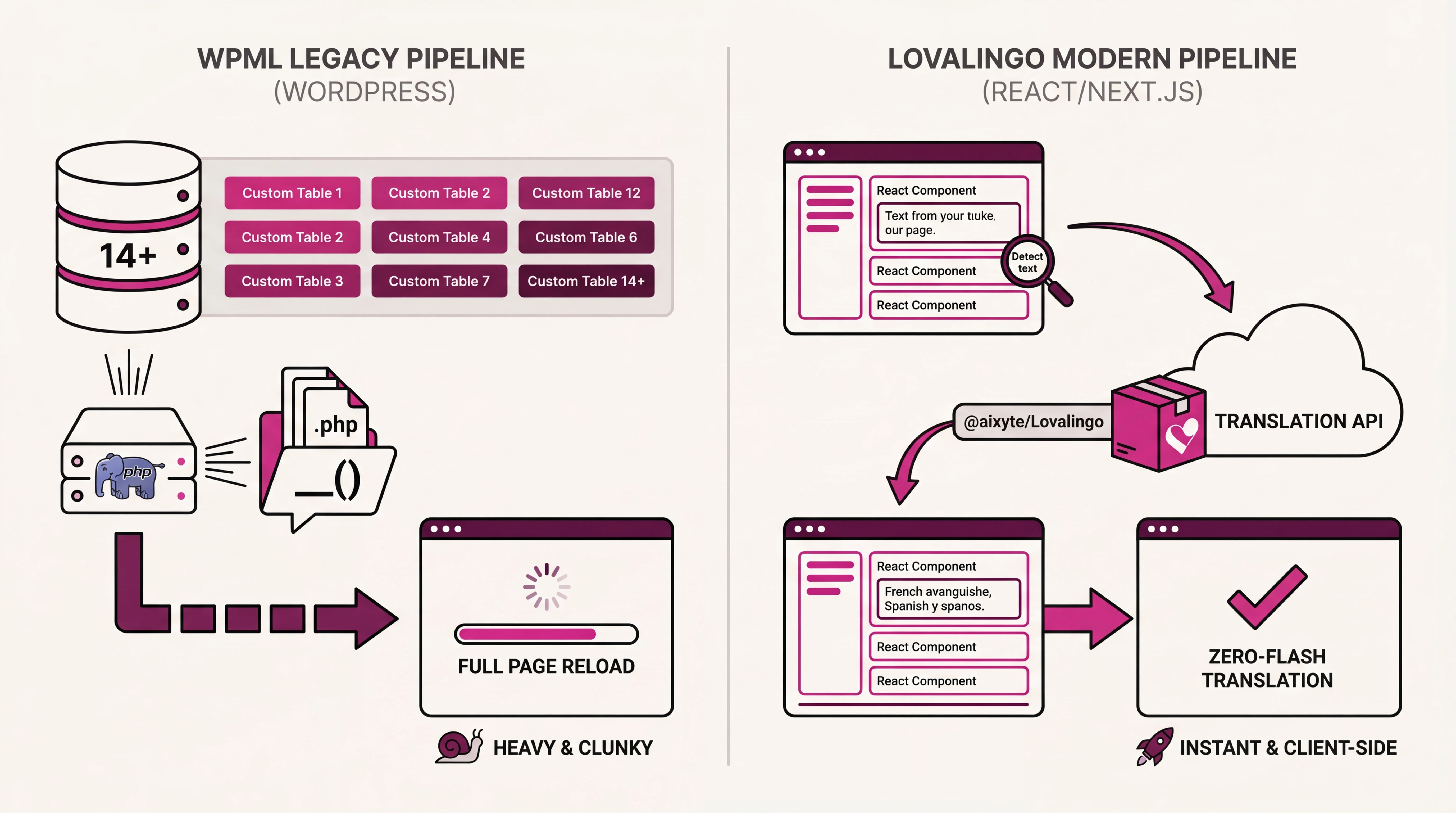
WPML handles WordPress translation well, but it doesn't work with React or Next.js. If you're building modern JavaScript applications, you need a different approach. lovalingo provides multilingual support for React apps through a single prompt, with zero-flash translation and automatic SEO optimization.
Why WPML Doesn't Work for React
WPML is built exclusively for WordPress. It depends on WordPress's database structure, admin panel, and PHP backend. Modern React and Next.js applications require:
Native React integration through hooks and providers
Zero-flash translation without flickering content
Component-level control over translated content
Support for TypeScript, Tailwind, and modern tooling
API-first architecture independent of databases
WPML does not provide any of these capabilities for JavaScript applications.
How lovalingo Addresses React Translation
lovalingo brings comprehensive translation capabilities to React and Next.js applications. Here's how the two approaches compare:
AspectWPML (WordPress)lovalingo (React/Next.js)PlatformWordPress onlyReact, Next.js, any JS frameworkIntegrationPHP pluginNPM packageDeveloper ExperienceAdmin UIReact hooks + dashboardPerformanceServer-renderedZero-flash client-sideSEOExcellentExcellent (hreflang, meta tags)TypeScriptNot applicableNative support
Key Differences
Platform Architecture
WPML requires a WordPress installation and stores translations in a MySQL database. It uses PHP for rendering and ties into the WordPress theme system.
lovalingo works with any React or Next.js application. It uses a cloud-based translation API with client-side rendering and caching. The solution is framework-agnostic and works with any UI library.
Developer Workflow
With WPML, developers work within the WordPress admin panel, manually entering translations or using string scanning through the WordPress backend.
lovalingo uses a modern web dashboard with automatic content detection. The system identifies and translates new React components instantly, with AI-powered translations and manual override capability when needed.
Translation Management
Both solutions offer glossaries, translation memory, and bulk operations. lovalingo's dashboard is designed for JavaScript developers rather than WordPress administrators.
Custom glossary support ensures technical terms and brand names remain consistent across all translations. Exclusion tags prevent translation of specific code blocks or identifiers when needed.
Feature Comparison
String Translation
WPML scans PHP templates and registers strings in the database.
lovalingo automatically detects all text content in your React components without manual registration. New content is identified and translated instantly.
Language Switcher
WPML provides a shortcode or widget that renders a dropdown in WordPress.
lovalingo includes a customizable React component that integrates naturally with your application's design.
SEO Optimization
Both solutions generate hreflang tags for proper international SEO. lovalingo also translates meta descriptions automatically and handles URL structure for path-based routing:
yourapp.com/en/pricing
yourapp.com/de/preise
yourapp.com/es/precios
Translation Memory
WPML stores translations in the WordPress database and reuses them across pages.
lovalingo uses cloud-based translation memory accessible across all your projects. Translate a phrase once, and it applies everywhere in your app and future projects.
Glossary Support
Both solutions support custom translations for specific terms. In lovalingo, you define terms through the dashboard:
Keep brand names unchanged across languages
Specify exact translations for technical terminology
Enforce consistency automatically across all content
When to Choose Each Solution
Choose WPML when:
You're building a WordPress site (blog, WooCommerce store)
Your entire tech stack is PHP-based
You need WordPress-specific integrations (ACF, Elementor)
Your team already works within WordPress workflows
Choose lovalingo when:
You're building a React or Next.js application
Your backend uses Node.js, Python, Go, or any modern API
You're using AI coding tools like Lovable, v0, Bolt, or Claude
You want TypeScript support and modern developer experience
Zero-flash translation matters for user experience
Migrating from WordPress + WPML to React + lovalingo
If you're rebuilding a WordPress site in React, here's how to migrate your translations:
Export from WPML: Use WPML's XLIFF export from String Translation in WordPress admin.
Convert format: lovalingo accepts CSV or JSON glossary imports:
json
[
  {
    "source": "Hello World",
    "translations": {
      "de": "Hallo Welt",
      "es": "Hola Mundo",
      "fr": "Bonjour le monde"
    }
  }
]
Import to lovalingo: Upload through the Glossary tab in the lovalingo dashboard.
Install in your React app: Add lovalingo through npm and wrap your application with the provider. Your existing translations now power your React application.
Pricing Comparison
WPML
Multilingual CMS: $99/year (1 site)
Multilingual CMS Lifetime: $299 (unlimited sites)
Translation Service: $0.09/word via WPML Credits
lovalingo
Starter: Free (1 language, unlimited words)
Start-up: $9/month (3 languages, SEO features)
Global: $29/month (unlimited languages, priority support)
Translations are included with AI-powered processing. No per-word charges.
Summary
WPML remains the standard for WordPress translation. For React and Next.js applications, lovalingo provides equivalent capabilities designed specifically for JavaScript frameworks:
Zero-flash translation prevents content flickering during language transitions
Automatic detection identifies and translates new components instantly
One-prompt configuration enables multilingual deployment quickly
SEO tools generate hreflang tags and translated meta descriptions automatically
Custom glossary ensures technical terms and brand names stay consistent
Getting Started
Sign up at lovalingo.com/auth
Install via npm
Add the provider to your app
Deploy with multilingual support
Questions? Contact us here: https://lovalingo.com/en/help/support