
How to Translate React (Without the i18n Headache)
Struggling with React i18n for translations? Traditional methods involve complex setups and manual string extraction, leading to hundreds of lines of configuration before any actual translation. Discover a simpler approach to translate React projects without the usual headaches.
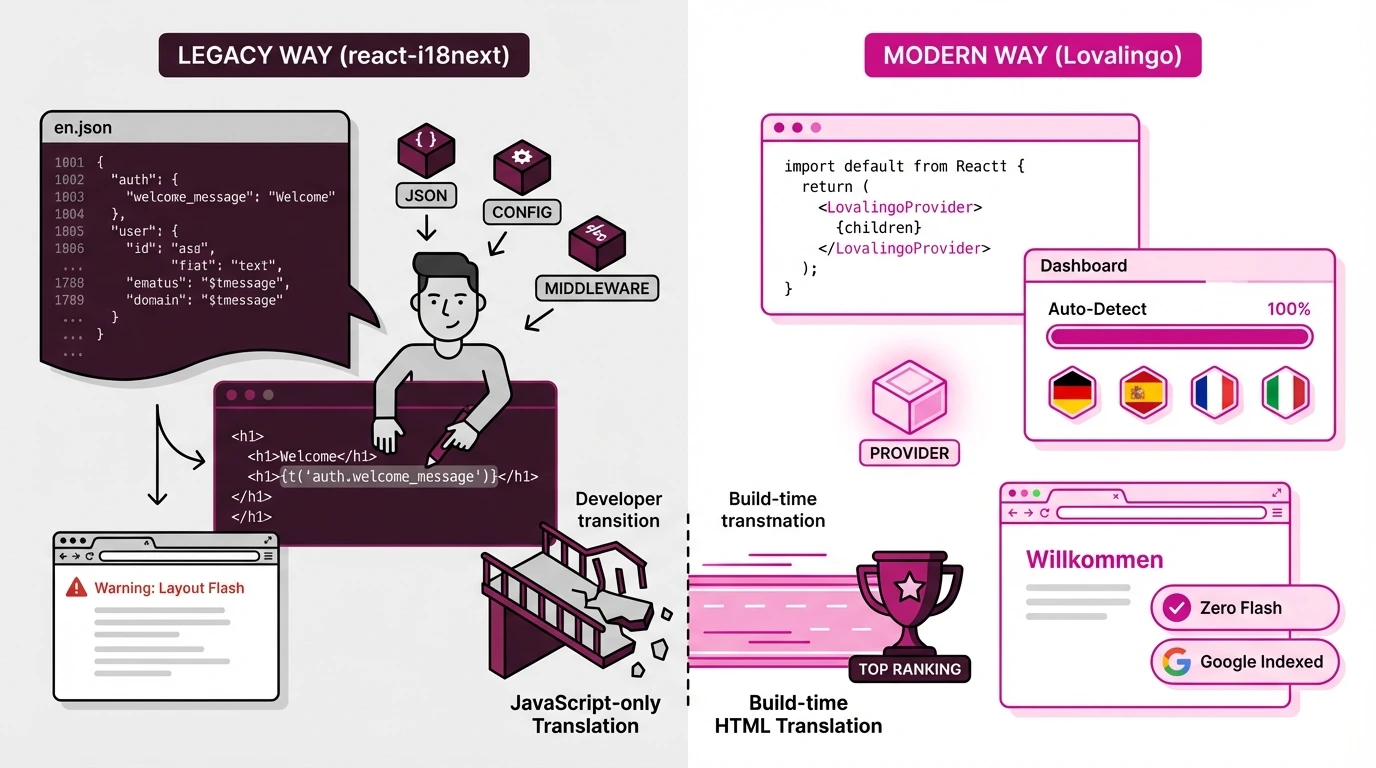
To translate React projects, every language translation tutorial follows the same script: install react-i18next, create a configuration file, set up language detection, organize your JSON dictionaries by namespace, wrap components in translation providers, and manually extract every string into translation keys.
By the time you've finished the setup, you've added hundreds of lines of configuration code and still haven't translated a single word.
There's a simpler approach - one that doesn't require restructuring your entire codebase around translation keys.
The Problem With Traditional React i18n
The standard React internationalization stack - typically i18next with react-i18next - was designed for large teams with dedicated localization workflows. It's powerful, flexible, and built to handle complex enterprise requirements.
It's also painful for most React projects.
The configuration overhead. Before translating anything, you need to configure i18next initialization, set up language detection, define fallback behaviors, configure interpolation settings, and integrate with your routing. The official i18next React setup guide runs several hundred lines before you display "Hello World" in two languages.
The extraction problem. Every piece of text in your application needs to be replaced with a translation function call. A simple <h1>Welcome</h1> becomes <h1>{t('welcome.title')}</h1>. Multiply that across your entire codebase - buttons, labels, error messages, tooltips, placeholder text - and you're looking at hundreds or thousands of manual replacements.
The JSON maintenance burden. Each language requires its own JSON file with matching keys. Add a feature with 10 new strings? Update en.json, es.json, fr.json, de.json. Change a label? Update four files. Forget one? Your German users see English text randomly scattered through the interface.
The synchronization nightmare. With 200 translatable strings across 5 languages, you're managing 1,000 translation entries. When keys drift out of sync between files - and they will - debugging which translation is missing becomes a scavenger hunt through nested JSON objects.
This workflow made sense when React applications took months to build. It makes less sense when you're shipping features weekly.
React Translation: The Manual Approach vs Automated Detection
Here's what adding German translation looks like with traditional i18n versus automated detection:
Task | react-i18next | Lovalingo |
|---|---|---|
Initial setup | Install packages, configure i18n.js, set up providers, language detection | Run one installation prompt |
Extract strings | Replace every text element with t('key') calls | Automatic detection |
Add new language | Create JSON file, add all translation keys | Select language in dashboard |
Translate new content | Manually add keys to all JSON files | Automatic |
Handle pluralization | Configure ICU message format per key | Automatic |
SEO (hreflang tags) | Manual implementation | Automatic generation |
Ongoing maintenance | Update JSON files with every content change | None |
The architectural difference matters. i18next requires you to restructure your code around translation keys. Automated detection tools work with your existing components and handle translation transparently.
How Automated React Translation Works
Instead of extracting strings into JSON files, automated translation tools detect translatable content in your React components and translate it at build time.
Step 1: Install the package
npm install @lovalingo/lovalingo
Step 2: Wrap your app
// src/App.tsx
import { LovalingoProvider } from '@lovalingo/lovalingo';

function App() {
  return (
    <LovalingoProvider
      publicAnonKey="your_public_key"
      defaultLocale="en"
      locales={["de", "es", "fr"]}
      routing="path"
    >
      <YourApp />
    </LovalingoProvider>
  );
}
Step 3: Deploy
Your React app now serves translated content. No string extraction. No JSON files. No t() function calls scattered through your codebase.
Why Build-Time Translation Matters for SEO
Here's where the implementation approach creates real business impact.
Runtime translation tools inject translations after the page loads via JavaScript. Search engine crawlers see your original HTML response before JavaScript executes. If translations only exist after hydration, Google indexes your English content and ignores everything else.
Your German pages might exist for users, but they don't exist for search engines.
Build-time translation generates translated content as actual HTML. When Googlebot crawls your /de/ route, it sees German content in the initial response. The hreflang tags exist in the document head. The translated meta descriptions appear in the source.
What proper React translation should generate:
Hreflang tags linking all language versions
Language-specific URLs (
/de/about,/es/about)Translated meta titles and descriptions
Multilingual XML sitemap
Proper
<html lang="">attributes
With react-i18next, you implement each element manually. The library handles string translation but leaves SEO configuration entirely to you.
When to Use Traditional i18n Libraries
Automated translation isn't the right choice for every React project.
Use react-i18next or react-intl when:
You need granular control over every translation choice
Your organization has established translation workflows with TMS integration
You're building an application with complex pluralization rules across many languages
You have dedicated localization engineers managing translations
Your content includes highly technical or specialized terminology requiring human review
Use automated translation when:
You want multilingual support without restructuring your codebase
You're building with vibe coding tools like Lovable, Bolt, or v0
SEO in multiple languages is a business priority
You don't have dedicated localization resources
You're shipping features faster than you can maintain JSON files
The decision comes down to control versus convenience. Some projects need the flexibility of manual translation management. Many don't.
Setting Up React Translation for Multiple Languages
Regardless of which approach you choose, effective multilingual React apps require certain technical elements.
Language-specific routing. Users and search engines need distinct URLs for each language. The two common patterns are path-based (/de/page) and subdomain-based (de.example.com). Path-based routing consolidates domain authority and works better for most React applications.
Language detection. Your app should detect user language preferences from browser settings (Accept-Language header) while allowing manual override. Store the preference in a cookie or localStorage to persist across sessions.
Hreflang implementation. These tags tell search engines which language version to serve different users:
<link rel="alternate" hreflang="en" href="https://example.com/page" />
<link rel="alternate" hreflang="de" href="https://example.com/de/page" />
<link rel="alternate" hreflang="x-default" href="https://example.com/page" />
Translated metadata. Page titles and descriptions should appear in the correct language for each route. German users searching in German should see German snippets in their search results.
Language switcher. Provide an obvious way for users to change languages. The switcher should preserve the current page - switching from /about to German should land on /de/about, not the German homepage.
The Flash Problem: Runtime vs Build-Time
One technical issue separates professional multilingual implementations from amateur ones: the flash of untranslated content.
With runtime translation, your React app renders in the default language first. JavaScript then detects the user's preference and swaps in translated content. Users see English text flicker to German. The delay might be 100ms or 500ms depending on network conditions, but it's visible.
This flash signals to users that something is wrong. It undermines the perception that your app was built for their market. For landing pages where first impressions drive conversion, that flicker costs money.
Build-time translation eliminates the flash entirely. The German version exists as German HTML from the first byte. No JavaScript swap. No visible transition. The page loads in the correct language immediately.
Real Performance: What to Expect
After configuring automated translation on a React marketing site, Google Search Console showed:
2,180 impressions across multilingual pages within 6 weeks
79 clicks from organic search in non-English markets
Position 12.3 average for translated content
The growth curve followed a predictable pattern: flat for two weeks while Google discovered the new language URLs, then steady acceleration as pages gained ranking authority.
This timeline - 2-3 weeks to initial indexing, 4-6 weeks to meaningful traffic - aligns with standard SEO expectations for new content. The difference is achieving it without building custom i18n infrastructure.
Getting Started With React Translation
Adding language translation to React doesn't require JSON file management or t() function calls throughout your codebase anymore.
For React apps where you want multilingual support without the traditional i18n complexity:
Create a free account at lovalingo.com
Add your domain
Run the installation prompt
Enable SEO signals
Submit your sitemap to Google Search Console
Your React app serves translated content within minutes. Google indexes your language versions within weeks.
The 71,000+ weekly downloads of react-i18next show that developers want React translation solutions. The question is whether you want to manage that infrastructure manually or have it handled automatically.
Frequently Asked Questions
Does this work with Next.js, Remix, and other React frameworks?
Yes. Lovalingo works with any React application regardless of the meta-framework. The provider wraps your app the same way whether you're using Create React App, Vite, Next.js, or Remix.
How does automatic translation handle context and nuance?
Lovalingo uses AI translation that considers surrounding content for context. For specialized terminology, the paid plans include glossary features where you can define terms that should remain untranslated or translate in specific ways.
What about right-to-left languages like Arabic?
RTL languages are supported. The language switcher and routing work the same way. Your CSS should include appropriate RTL handling, but that's a styling concern separate from translation.
Can I review translations before they go live?
Yes. The dashboard shows all detected content and translations. You can edit any translation manually before publishing. Changes sync to your live site without redeployment.
What happens if I need to exclude certain text from translation?
Brand names, technical terms, and code blocks can be excluded using data attributes or dashboard rules. The global plan includes advanced exclusion controls.